


New guy from Texas

Thread Starter
Rodney
Joined: Jun 2011
Posts: 2,589
From: Houston, TX
New guy from Texas
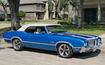
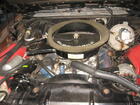
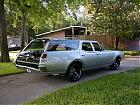
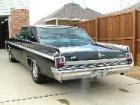
I'm a new member from Houston, TX. I've got a '71 Cutlass Supreme, and a '72 442 convertible (both are in need of serious restoration work). I've been a early 70's Cutlass guy since I was in high school (early 80's) - my first ride was a '71 Cutlass Supreme convertible. I put the olds' habit on the shelf for about 15 years, but it never really left me. So I'm jumping back in with both feet. This site is a great resource, I've gleaned many tips from the posts here, the knowledge base here is astounding.




 Post some pictures of your rides when you can.

Thread Starter
Rodney
Joined: Jun 2011
Posts: 2,589
From: Houston, TX
'71 Cutlass Supreme
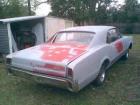
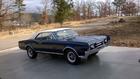
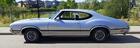
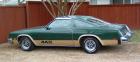
Here's pic of the '71 Supreme the day I dragged it out of the field. Had bring a full set of wheels and tires because the ones on the car were completely dry rotted from sitting so long - definitely not road worthy. I don't have a trailer so I rented a U-Haul tow-dolly to get it back to Houston - about a 5 hour drive, one-way. It was a very long, but exciting day.
Just an Olds Guy
Joined: Jul 2008
Posts: 24,528
From: Edmonton, AB. And "I am Can 'eh' jun - eh"
cdrod - Welcome aboard from Canada, eh?
I think you're not copying the URL just trying to copy the jeg image? Some things you can do.
1. Host the pic on photobucket or similar and copy the URL from there to paste here. Use the icon that looks like a envelope with mountains to paste the URL
2. Go to the advanced setting and select Manage attachments. It looks like you're trying to upload from your desktop or your C drive picture files. Use the 'paper clip' icon and then browse the pics you have on your computer. Limit of 5 this way. If the pics are really huge format, you'll have to downsize them to document size to upload on C.O.
3. You can always copy/paste from the hosting server you use. It will insert here. Only thing is if you move, alter or delete the pic on your host server, it will disappear from here to. It will be replaced by a 'placeholder' non image.
Does this help?
I think you're not copying the URL just trying to copy the jeg image? Some things you can do.
1. Host the pic on photobucket or similar and copy the URL from there to paste here. Use the icon that looks like a envelope with mountains to paste the URL
2. Go to the advanced setting and select Manage attachments. It looks like you're trying to upload from your desktop or your C drive picture files. Use the 'paper clip' icon and then browse the pics you have on your computer. Limit of 5 this way. If the pics are really huge format, you'll have to downsize them to document size to upload on C.O.
3. You can always copy/paste from the hosting server you use. It will insert here. Only thing is if you move, alter or delete the pic on your host server, it will disappear from here to. It will be replaced by a 'placeholder' non image.
Does this help?
Registered User
Joined: Mar 2012
Posts: 494
From: Dallas, Texas
btrbill check out the Saturday evening car show at the Kroger grocery store parking lot at Spring Cypress and Champion Forest in Spring. I go when ever I am down there. It goes from March to November, every Saturday unless it's raining. It's usually pretty good.
http://niftee50ees.com/home.html


Thread Starter
Rodney
Joined: Jun 2011
Posts: 2,589
From: Houston, TX
Very Major build!
I guess I need to learn how to start a new thread for this project. I've been collecting parts since April for the impending restoration. Much of that time has been spent getting my shop ready. I've disassembled most of the car (bagged & documented the location, casting/part number & julian dates) and now ready to lift the body off the frame. Any tips or suggestions on floor pan removal/replacement would be very helpful. My floor boards look like rusty swiss cheese. LOL.
Just an Olds Guy
Joined: Jul 2008
Posts: 24,528
From: Edmonton, AB. And "I am Can 'eh' jun - eh"
From the sounds of it, you're well organized on the parts find/storage. That's a good thing. Hope you documented the car with pictures before you started. As you progress through the build, either use a log book or create a gant chart showing major accomplishments and where some parts of the projects 'overlap' to maximize your efficiency during the build.
I'm not a body guy, but if you're cutting out the majority of the floor pans, I know you'll need to structurally cross brace the body to keep everything lined up. I'm sure someone with body skills and fabrication knowledge will chime in with some helpful suggestions. Looking forward to your new thread!
Thread Starter
Rodney
Joined: Jun 2011
Posts: 2,589
From: Houston, TX
Big pictures
HeyAllan:
I finally started my Major Builds thread - thought I'd better start posting before I forgot where I started. I have a posting question for you. How do you get your pictures to show up so big and within the main part of the posting? Mine always show as little linked icons at the bottom of my posts. I like the way your posts look when the pictures show up within the text. Thanks for the help!
I finally started my Major Builds thread - thought I'd better start posting before I forgot where I started. I have a posting question for you. How do you get your pictures to show up so big and within the main part of the posting? Mine always show as little linked icons at the bottom of my posts. I like the way your posts look when the pictures show up within the text. Thanks for the help!
Just an Olds Guy
Joined: Jul 2008
Posts: 24,528
From: Edmonton, AB. And "I am Can 'eh' jun - eh"
Actually it's really easy.
You already will be working in the 'Advanced' area so just clik on the pic link (manage attachments) and it will open up as a large image.
right clik your mouse and select 'copy IMG URL' (url means Uniform Resource Locater. It's computer speak that helps the server locate and display the image full size)
Put your cursor where you want the image to be in the thread and clik there (the image won't appear - this is just for positioning)
Now, clik that icon that looks like a postcard with mountains. It will open up and ask you to paste the IMG URL. (Ctrl + V is the shortcut keyboard for 'paste'). Then say ok and the image will be inserted.
You won't see the image until you go to the 'Preview Post'. What you will see in the area you're working on is something like this :[url] https://classicoldsmobile.com/forums/parts-wanted/40798-1969-70-ram-air-442-hood.html#post333355 [/ url]
One nice thing about having these big pics is that you can see them even when you're not logged in. Hope this helps. Send me a PM if you have any troubles and I can walk you through any hiccups.
Sometimes when I find something on the web that already exists as an IMG file, I just clik onto the image and copy its URL. Then I paste it into the forum without having to go to the 'Advanced' area. That is a little risky because if ever the image is deleted at the source, it will also be gone from the CO server. Uploading the images to C.O. and then re-inserting them pretty much guarantees they'll stay there forever so anyone can see them.
You already will be working in the 'Advanced' area so just clik on the pic link (manage attachments) and it will open up as a large image.
right clik your mouse and select 'copy IMG URL' (url means Uniform Resource Locater. It's computer speak that helps the server locate and display the image full size)
Put your cursor where you want the image to be in the thread and clik there (the image won't appear - this is just for positioning)
Now, clik that icon that looks like a postcard with mountains. It will open up and ask you to paste the IMG URL. (Ctrl + V is the shortcut keyboard for 'paste'). Then say ok and the image will be inserted.
You won't see the image until you go to the 'Preview Post'. What you will see in the area you're working on is something like this :[url] https://classicoldsmobile.com/forums/parts-wanted/40798-1969-70-ram-air-442-hood.html#post333355 [/ url]
One nice thing about having these big pics is that you can see them even when you're not logged in. Hope this helps. Send me a PM if you have any troubles and I can walk you through any hiccups.
Sometimes when I find something on the web that already exists as an IMG file, I just clik onto the image and copy its URL. Then I paste it into the forum without having to go to the 'Advanced' area. That is a little risky because if ever the image is deleted at the source, it will also be gone from the CO server. Uploading the images to C.O. and then re-inserting them pretty much guarantees they'll stay there forever so anyone can see them.

Thread
Thread Starter
Forum
Replies
Last Post


