The Newbie Forum The place where you should introduce yourself. Do not ask technical questions here, use the site forum sections.

posting pics

Old Jul 27, 2016 | 02:37 PM
  #1  
tinlizzie23's Avatar
Thread Starter
tinlizzie23
 
Joined: Jul 2016
Posts: 20
From: Luray, VA
posting pics

Please forgive my ignorance, but computer savvy I am not. Was going to try and post a pic of my '57 Olds, and went to the sticky "how to post pictures". First instruction is to click the "go advanced" tab. Unfortunately, I can't find that tab. I'm probably blind, but I just don't see it. Could someone give me a hand here and steer me back on the road ? Thanks
Old Jul 27, 2016 | 03:37 PM
  #2  
tru-blue 442's Avatar
Old School Olds
 
Joined: Nov 2008
Posts: 9,269
From: Marble Falls TX
Just scroll down a little farther, you will see it, lower right side.
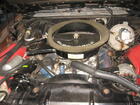
Click go advanced and then click manage attachments.
Attached Images
File Type: jpg
103_4264.JPG (523.8 KB, 4 views)
Old Jul 27, 2016 | 03:53 PM
  #3  
oldcutlass's Avatar
Administrator
 
Joined: Oct 2009
Posts: 42,456
From: Poteau, Ok
Its actually right next to the "Post Quick Reply" button.
Related Topics
Thread
Thread Starter
Forum
Replies
Last Post
oldcutlass
Non-Oldsmobile Classified
0
Dec 13, 2013 04:26 PM
oldcutlass
Cars For Sale
0
Dec 13, 2013 04:08 PM
oldcutlass
Parts For Sale
0
Dec 13, 2013 03:42 PM
ent72olds
Site Help
18
Mar 18, 2009 08:00 PM
morson82
Eighty-Eight
4
Jan 3, 2009 06:57 PM


Thread Tools
Search this Thread

All times are GMT -7. The time now is 07:04 PM.
