


my 1970 cutlass S UPDATE pics


Thread Starter
Registered User
Joined: Nov 2012
Posts: 162
From: Vernon NY
 my 1970 cutlass S UPDATE pics
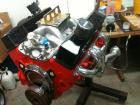
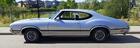
Hello everyone finally took some pics of my resto project as u can see I'm ahead of the game since it is really in great shape and was recently painted until the barn collapses on the guy I bought it from. Well I can't figure how to upload pics to this post. Check out my profile pics and album hopefully that will work.


Just an Olds Guy
Joined: Jul 2008
Posts: 24,528
From: Edmonton, AB. And "I am Can 'eh' jun - eh"
Hello everyone finally took some pics of my resto project as u can see I'm ahead of the game since it is really in great shape and was recently painted until the barn collapses on the guy I bought it from. Well I can't figure how to upload pics to this post. Check out my profile pics and album hopefully that will work.
re: posting pics. Try this and see if you can get it to work for you.
* clik the 'go advanced' tab
* Press the icon that looks like a paper clip; and A 'Manage Attachments' box will appear
* Choose (navigate on your computer to where the pics are stored) and hit 'open'. repeat for all 5 pics.
* Hit 'upload'. It may take a bit of time depending on your pic resolution. If you have ultra high res, you will have to 'resize' them with your picture editor to a 1024X768 size or smaller for the C.O. server to accept them.
* Close the "manage attachments' box.
* Preview your post and the images will be at the bottom
* Hit 'submit post' and the thread will have the images installed at the bottom. Unfortunately you can only do 5 pics at a time this way.
If you have the pics hosted on another web server?
* Copy the IMG url and Press the icon that looks like an envelope with mountains on it. Paste the URL into that box and hit 'ok'. You can install up to 20 images this way.
* Be sure to preview your work.
* Make sure the images don't carry on across the page, stack them for easier viewing.
Thread Starter
Registered User
Joined: Nov 2012
Posts: 162
From: Vernon NY
Yikes, looks like the barn fell on the left fender - that's a big dent. Should be able to fix it fairly easily though.
re: posting pics. Try this and see if you can get it to work for you.
* clik the 'go advanced' tab
* Press the icon that looks like a paper clip; and A 'Manage Attachments' box will appear
* Choose (navigate on your computer to where the pics are stored) and hit 'open'. repeat for all 5 pics.
* Hit 'upload'. It may take a bit of time depending on your pic resolution. If you have ultra high res, you will have to 'resize' them with your picture editor to a 1024X768 size or smaller for the C.O. server to accept them.
* Close the "manage attachments' box.
* Preview your post and the images will be at the bottom
* Hit 'submit post' and the thread will have the images installed at the bottom. Unfortunately you can only do 5 pics at a time this way.
If you have the pics hosted on another web server?
* Copy the IMG url and Press the icon that looks like an envelope with mountains on it. Paste the URL into that box and hit 'ok'. You can install up to 20 images this way.
* Be sure to preview your work.
* Make sure the images don't carry on across the page, stack them for easier viewing.
re: posting pics. Try this and see if you can get it to work for you.
* clik the 'go advanced' tab
* Press the icon that looks like a paper clip; and A 'Manage Attachments' box will appear
* Choose (navigate on your computer to where the pics are stored) and hit 'open'. repeat for all 5 pics.
* Hit 'upload'. It may take a bit of time depending on your pic resolution. If you have ultra high res, you will have to 'resize' them with your picture editor to a 1024X768 size or smaller for the C.O. server to accept them.
* Close the "manage attachments' box.
* Preview your post and the images will be at the bottom
* Hit 'submit post' and the thread will have the images installed at the bottom. Unfortunately you can only do 5 pics at a time this way.
If you have the pics hosted on another web server?
* Copy the IMG url and Press the icon that looks like an envelope with mountains on it. Paste the URL into that box and hit 'ok'. You can install up to 20 images this way.
* Be sure to preview your work.
* Make sure the images don't carry on across the page, stack them for easier viewing.

Thread
Thread Starter
Forum
Replies
Last Post
davesdelta
Major Builds & Projects
26
Mar 30, 2012 05:34 PM


