General Discussion Discuss your Oldsmobile or other car-related topics.

Custom avatars

Thread Tools
 
Search this Thread
 
Old May 29, 2008 | 08:21 AM
  #1  
Oldsfan's Avatar
Thread Starter
Registered User
 
Joined: Jul 2006
Posts: 331
.

Last edited by Oldsfan; Oct 17, 2008 at 01:52 PM.
Old May 29, 2008 | 10:57 AM
  #2  
Oldsguy's Avatar
Past Administrator
 
Joined: May 2004
Posts: 10,358
From: Rural Waxahachie Texas
I think if you re-size the original (from your source) then up-load that one you will end up with a larger image for you avatar. If you have trouble, contact Paul (Omicron) but don't tell him I sent you down the wrong path.........
Old May 30, 2008 | 02:55 AM
  #3  
88 coupe's Avatar
Junior Member
 
Joined: Oct 2004
Posts: 2,212
From: Southern CA
Originally Posted by Oldsfan
........ Mine is so small! ........
Max allowed, is 80 x 80 pixels. Yours is already 80 pixels wide.

Norm
Old May 30, 2008 | 09:09 AM
  #4  
88 coupe's Avatar
Junior Member
 
Joined: Oct 2004
Posts: 2,212
From: Southern CA
Originally Posted by Oldsfan
........ 144 x 110...
My error. 80 x 80 was in effect when I signed up.

Was going to try a 100 x 100. Got as far as removing my 80 x 80.

Likely there is some corruption left over from the "crash".

Norm
Old May 30, 2008 | 11:27 AM
  #5  
joe_padavano's Avatar
Old(s) Fart
 
Joined: Mar 2007
Posts: 50,770
From: Northern VA
Originally Posted by 88 coupe
My error. 80 x 80 was in effect when I signed up.

Was going to try a 100 x 100. Got as far as removing my 80 x 80.

Likely there is some corruption left over from the "crash".

Norm
The control panel "Edit Avatar" function still says 80 x 80
Old May 30, 2008 | 01:56 PM
  #6  
joe_padavano's Avatar
Old(s) Fart
 
Joined: Mar 2007
Posts: 50,770
From: Northern VA
Originally Posted by Oldsfan
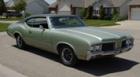
So, how does this guy get this big avatar?

https://classicoldsmobile.com/forums...rs/olds64.html

I think he knows somebody...
Hey, a big car needs a big avatar...
Old May 30, 2008 | 02:06 PM
  #7  
Olds64's Avatar
Moderator
 
Joined: Jul 2007
Posts: 18,200
From: Edmond, OK


Sorry, Oldsguy had to upload a picture for me with his Administrator CP. For some reason my User CP wasn't working properly. The picture we originally uploaded was REALLY big. Fortunately, Omicron resized it for me. You should have seen the avatar when we uploaded it. It was annoyingly huge.
Old May 30, 2008 | 07:08 PM
  #8  
Oldsguy's Avatar
Past Administrator
 
Joined: May 2004
Posts: 10,358
From: Rural Waxahachie Texas
Contact Paul (Omicron), he is the computer-techno-wiz-bang-super-duper-avatar dude.
Old May 30, 2008 | 08:52 PM
  #9  
88 coupe's Avatar
Junior Member
 
Joined: Oct 2004
Posts: 2,212
From: Southern CA
Originally Posted by joe_padavano
The control panel "Edit Avatar" function still says 80 x 80
Not on my macines.


I may put mine back up, after the problem is resolved.

Norm
Old May 31, 2008 | 12:52 AM
  #10  
FTW65W29's Avatar
Junior Member
 
Joined: Feb 2006
Posts: 153
From: Ft Worth, Texas
Same Problem

I cannot even add an avatar. What is up with that?
Old May 31, 2008 | 04:59 AM
  #11  
74 Omega's Avatar
Registered User
 
Joined: Sep 2007
Posts: 361
From: New Hampshire
i cannot add one as well...
Old May 31, 2008 | 08:49 AM
  #12  
joe_padavano's Avatar
Old(s) Fart
 
Joined: Mar 2007
Posts: 50,770
From: Northern VA
Originally Posted by 88 coupe
Not on my macines.


Norm
Scroll down a little further on that page, Norm (see attached). Despite that, I was able to upload a larger file.
Attached Files
File Type: pdf
ClassicOldsmobile.pdf (55.7 KB, 27 views)
Old May 31, 2008 | 08:59 AM
  #13  
J-(Chicago)'s Avatar
Seasoned beater pilot.
 
Joined: Jan 2007
Posts: 5,468
From: Chicago
7 pms. you're famous! lol.
Old May 31, 2008 | 11:48 AM
  #14  
88 coupe's Avatar
Junior Member
 
Joined: Oct 2004
Posts: 2,212
From: Southern CA
Originally Posted by joe_padavano
Scroll down a little further on that page ........


How far down, do you think I need to scroll?

Norm.
Old Jun 1, 2008 | 05:17 AM
  #15  
71rocket's Avatar
car nut farmer
 
Joined: Dec 2007
Posts: 595
From: SE KS
I can't add an avatar either, green dot won't click off, can't reset feild.
Old Jun 1, 2008 | 06:33 AM
  #16  
Olds64's Avatar
Moderator
 
Joined: Jul 2007
Posts: 18,200
From: Edmond, OK
I didn't want anybody to get jealous about my avatar. I know it is pretty cool looking at such a large picture of an AWSOME car. Especially when you are just driving a Cutlass.

Actually, if Omicron wants to decrease the size of my avatar a bit more I wouldn't mind. Whatever works.
Old Jun 7, 2008 | 07:26 AM
  #17  
O's_Car's Avatar
Registered User
 
Joined: Jan 2008
Posts: 241
From: Wichita, KS
Has a resolution been found for this, or is it that we should contact the administrator individually? I too am missing the "Custom Avatar" field. Hate to see the administrator bombarded with a bunch of avatar requests...
Old Aug 19, 2008 | 11:54 AM
  #18  
KeithA0000's Avatar
69CuttyS
 
Joined: Jul 2008
Posts: 200
From: Ottawa Canada
I can't add an avatar either.
Old Aug 19, 2008 | 12:14 PM
  #19  
Oldsguy's Avatar
Past Administrator
 
Joined: May 2004
Posts: 10,358
From: Rural Waxahachie Texas
All I can say, (for the fourth time), is contact Paul and see what can be done. His user name is Omicron. Forgive me if you have and he hasn't been able to help out or it is beyond his ability or he has just not done it. Dunno......

Old Aug 19, 2008 | 02:18 PM
  #20  
Jamesbo's Avatar
Moderator
 
Joined: Jun 2008
Posts: 18,058
From: Atlanta, Georgia
Originally Posted by 88 coupe
Not on my macines.


I may put mine back up, after the problem is resolved.

Norm
IMHO it is definitely a Vishnu thing. Don't mess with 'em
Old Sep 15, 2008 | 10:07 AM
  #21  
gearheads78's Avatar
car guy
 
Joined: Apr 2008
Posts: 5,675
From: Dallas TX
Mine looks just like Norm's. The green dot won't click off to be able to add anything.
Related Topics
Thread
Thread Starter
Forum
Replies
Last Post
Fred Kiehl
Parts For Sale
0
Jun 16, 2013 04:55 AM
317Cutty
General Discussion
24
Feb 4, 2013 08:34 PM
Oldsfan
General Discussion
3
Aug 27, 2007 08:10 AM
daverbmxer
Other
9
May 30, 2006 05:35 PM


All times are GMT -7. The time now is 01:38 AM.